Everything between the order and the books, done every day.
FynOS covers the work that sits between your sales channels and your accounting software: getting every report in, matching it, costing it, paying suppliers and preparing the books. This page walks through each part, with the screens your team would use.
Each part of FynOS, with the screens your team would use.
Start the day on one screen.
The dashboard opens on cash, cost and stock from the same ledger the rest of FynOS writes to, the overnight checks with the amount at stake in each, and what needs a person today, listed with the money it is holding up. Most of the matching has already closed, and the screen shows that too, so nobody has to check work that is done.
Cash, cost and stock on one screen, with what needs a person today.
Needs you
Held invoices, with the reason and the amount.
Overnight checks
Nightly cash, cost and stock checks, with amounts.
What FynOS closed
Matched, posted and settled without anyone touching it.
Needs you
Invoices held in staging, with the reason and the amount at stake.
Overnight checks
Cash, cost and stock checks from the nightly snapshot, each with the amount at stake.
What FynOS closed
What was matched, posted and settled without anyone touching it.
See where cash is tied up, and what frees it.
Working capital is measured every day as three clocks: how long stock sits, how long channels take to pay you, and how long you take to pay suppliers. FynOS breaks each clock down by category, channel and vendor, scores the business on them, and scores every SKU and supplier pair. A simulator shows what a new target would release before you commit to it.
Three clocks, every day: days in stock, days to get paid, days to pay.
The cash cycle, explained
Its trend, and what moved it since last month.
By category, channel and vendor
Days in stock, to collect and to pay.
Opportunity by SKU
Every SKU and supplier pair, scored.
Actions with an amount
Slow stock, early payments, missed discounts, each priced.
The cash cycle, explained
Its trend, and a split of what moved it against last month.
By category, channel and vendor
Days in stock by category, days to collect by channel, days to pay by vendor tier against contract.
Opportunity by SKU
Every SKU and supplier pair with its unit cost, volume, days and the working capital it needs, scored.
Actions with an amount
Slow stock to clear, suppliers paid ahead of terms, faster paying channels and early payment discounts missed, each with its amount.


Margin, growth and spend, from the same ledger.
Insights read the same ledger and answer the questions that usually take an analyst a week, from the same figures the rest of FynOS uses.
Answers that usually take an analyst a week, from the same ledger.
Margin waterfall
Gross sales down to contribution, step by step.
Acquisition and attribution
Orders tied to campaign and channel, by visible rules.
Revenue quality
Revenue after disputes and late payment.
Vendor spend
Price changes and on time delivery, by supplier.
Margin waterfall
Gross sales through returns, discounts, cost of goods and marketing, down to contribution.
Acquisition and attribution
Which orders came from which campaign and channel, by rules you can see.
Revenue quality
How revenue holds up after disputes and late payment, by customer and channel.
Vendor spend
Price changes and on time delivery, by supplier.
Every channel's reports, captured daily.
Takto is the intake layer. It holds a connector for each place you sell or settle. Where a portal offers no usable interface, a browser agent pulls the reports from your own signed-in session, in your team's own browser. Every source shows what it delivered and when it last ran, so you know what a number was built on before you trust it.
Takto brings every report in, by connector or from your own signed-in session.
A connector per source
Marketplaces, storefronts, payment providers, inventory systems and ad platforms.
From your own logins
Reports pulled from your team's signed-in session.
Email and upload
Supplier invoices by email; uploads kept with their source.
Changes noted
A report that changed after capture is marked.
A connector per source
Marketplaces, storefronts, payment providers, inventory systems and ad platforms.
From your own logins
The browser extension pulls reports in your team's session, and every login shows when it last pulled.
Email and upload
Supplier invoices sent to a dedicated address are read and routed. Anything uploaded is kept with its source and date.
Changes noted
When a past month's report is captured again with different contents, the capture log marks it.


Every channel's revenue, and what it still owes you.
Orders from your storefront, your marketplaces and wholesale land in one order model, so a sale reads the same wherever it happened. Each order is tied to the payout that paid it, and payouts are matched to the bank statement.
Every order in one model, tied to its payout and to the bank.
One order model
Every order priced and reported the same way.
What each channel owes
Open receivables by channel, with overdue amounts flagged.
One order, start to finish
Sale, fees, sales tax and the net that arrived.
Contribution by channel
What each channel leaves after fees and costs.
One order model
Storefront, marketplace and trade orders, priced and reported the same way.
What each channel owes
Open receivables by channel, with overdue amounts flagged.
One order, start to finish
The sale, each channel fee, the sales tax the channel collected, and the net that arrived.
Contribution by channel
What each channel leaves you after marketplace fees and cost of goods.

Every payout, matched to the orders that earned it.
Marketplaces take their fees before they pay you. FynOS reads every payout file on the channel's own calendar and opens it back up: the orders it covers, every fee by name, refunds and adjustments, and the sales tax the marketplace collected and remitted. Payouts are then matched to the bank statement in bank reconciliation.
Every payout opened back up into its orders, fees, refunds and tax.
Every deduction named
Each fee separated, with the effective rate.
Checked against the channel
Tied to the channel's own payout total.
Platform ledger
What each channel owed against what it settled.
Every deduction named
Referral, fulfillment and other fees separated, with the effective fee rate per channel.
Checked against the channel
Where the channel states a payout total, as Shopify Payments, Stripe, Klarna and the department store marketplaces do, the file is tied to it.
Platform ledger
What each channel owed set against what it settled, over time.

Wholesale and retail accounts on the same ledger.
Trade customers buy on terms, not at a checkout. FynOS follows each trade order from receipt to dispatch, bill and collection, and ages every invoice by its due date, next to your marketplace and storefront sales.
Trade orders followed from receipt to collection, aged by due date.
Receive, dispatch, bill, collect
One flow per trade order, every step recorded.
Aged by due date
Each invoice measured against its due date.
Credit notes
Raised against the invoice they adjust.
Next to every other channel
Trade sales beside every other channel in reports.
Receive, dispatch, bill, collect
One flow for every trade order, with each step on the record.
Aged by due date
Each invoice measured against its due date.
Credit notes
Raised against the invoice they adjust, so the balance owed stays right.
Next to every other channel
Trade revenue and receivables sit beside marketplace and storefront sales in every report.
Stock at what it cost to land.
Inventory is an accounting problem before it is a warehouse problem. FynOS carries every unit at the cost it took to land, with freight and duty carried on the receipt lines as your inventory system allocates them, and releases cost of goods as units sell, against the order and the channel. The stock figure is compared with the balance sheet.
Every unit carried at landed cost, with cost of goods on each sale.
Landed cost
Freight and duty on each receipt line.
Cost of goods on every sale
Released as units move.
A ledger that ties
Every movement at cost, compared with the books.
Stock health
Running out, slowing down or stopped, by value.
Landed cost
Freight and duty carried on each receipt line, from your inventory system.
Cost of goods on every sale
Released as units move.
A ledger that ties
Every receipt, transfer, sale and return moves stock at cost, compared with the books.
Stock health
What runs out within 14 days, what has slowed past 90, and what has stopped selling, by value.

Every receipt, transfer and count, costed.
The inventory module runs the physical side of stock: receiving against purchase orders, transfers between locations, stock takes, adjustments and returns. Each movement carries its cost, so what the warehouse does and what the books say do not drift apart.
Receiving, transfers, stock takes and returns, each with its cost.
Receiving and inward checks
Received against the order; over-receipts held.
Transfers and stock takes
Moves between locations, and counts that post variance.
Returns
Returned units received back into stock at cost.
Live availability
What can be sold, by location.
Receiving and inward checks
Goods received against the order, with over-receipts held for review.
Transfers and stock takes
Moves between your warehouse, 3PL and marketplace locations, and counts that post their variance.
Returns
Returned units received back into stock at cost.
Live availability
What can be sold, by location.

One product, every channel's SKU code.
Every channel names the same product its own way. Catalog Mapper resolves those codes to one product as data arrives, working from your own transactions, and shows the confidence behind each match, and the evidence for any it sends to review. Packs, bundles and bills of materials are set up once, so a two pack sale moves the right units.
Each channel's SKU code resolved to one product, with the evidence.
Matched as data arrives
SKUs resolved to one product, with a confidence score.
Packs and bundles
Sold as one SKU, moved as their components.
Bills of materials
The components of every kit, each with its quantity.
Matched as data arrives
Channel SKUs resolved to one product, with a confidence score.
Packs and bundles
Sold as one SKU, moved as their components.
Bills of materials
The components of every kit, each with its quantity.

The paper trail closes itself.
A purchase order, a goods receipt and a supplier invoice are three views of one commitment. FynOS matches them line by line. When 500 units are ordered, 480 arrive and 500 are invoiced, the match names the order, the receipt and the 20 unit gap, and drafts a debit note for it.
Order, receipt and invoice matched line by line, with any gap named.
Purchase orders
Raised, approved and sent, with expected dates.
Goods receipts
What arrived, recorded against what was ordered.
3-way match
Order, receipt and invoice matched line by line.
Vendor master
One record per supplier, bank details encrypted.
Purchase orders
Raised, approved and sent, with expected delivery and expiry dates.
Goods receipts
What arrived, recorded against what was ordered.
3-way match
Order, receipt and invoice matched line by line.
Vendor master
One record per supplier, with terms, and bank details kept encrypted.

Invoices arrive as paper. They post as ledger.
Invoice AI reads each bill from a PDF, a photo or an email, extracts the supplier, the lines and the tax, and proposes its purchase order. A person confirms. Anything that cannot post yet waits in staging with the reason named, so the queue is a list of decisions rather than a pile.
Invoice AI reads each bill and proposes its purchase order. A person confirms.
Read from any format
A PDF, a photo, or the email it arrived in.
Hold reasons named
Missing supplier, possible duplicate or no purchase order.
Debit notes
Short shipments and returns raised back to suppliers.
Maker and checker
Whoever submits a bill cannot approve it.
Read from any format
A PDF, a photo, or the email it arrived in.
Hold reasons named
Supplier not yet in the master, possible duplicate, no purchase order.
Debit notes
Short shipments and returns raised back against the supplier.
Maker and checker
Whoever submits a bill cannot approve it.

Expenses in the right account. Payments approved before they go.
Expense classification works from a taxonomy, a posting map and supplier rules you publish. Bills get a proposed account for a person to accept. When bills fall due, a payment run gathers them into one proposal, the batch is approved before its bank file can be exported, and each line is then confirmed paid against the bank statement or marked returned.
Bills coded, paid in approved runs, and confirmed against the bank.
Supplier rules
A supplier rule applies to its next bill.
Employee reimbursements
Receipts booked to whoever paid, then approved.
One payment proposal
Everything due by a date, gathered into one batch.
Approved before money moves
No bank file until the batch is approved.
Supplier rules
Publish a rule for a supplier and it applies to that supplier's next bill.
Employee reimbursements
Receipts booked to the person who paid, and approved like any other bill.
One payment proposal
Everything due by a date, gathered into one batch.
Approved before money moves
No bank file until the batch is approved, and each line marked paid or returned.

Your books, fed every day.
FeedMap is how FynOS posts to the accounting software you already keep. Each FynOS account, with its channel, product and payment details, is mapped to an account in your own chart, so sales land in the accounts you already report on and money in lands in the right clearing account for each channel. Each day's journals are prepared as a file for your accountant to import into QuickBooks Online. Upload QuickBooks' journal report and FynOS checks that each entry was booked, by number and total.
Each day's journals, mapped to your chart, ready to import into QuickBooks Online.
Mapped to your chart
Unmapped lines are refused and named, never guessed.
A board for the month
One tile per day: prepared, sent, booked.
Drill into a line
Journal lines open to the orders behind them.
Changes after sending
Later changes drafted as an adjusting entry.
Mapped to your chart
The most specific rule wins. Anything unmapped is refused and named, never guessed.
A board for the month
Orders, payouts and stock, one tile per day, showing what is prepared, sent and booked.
Drill into a line
Journal lines open to the orders and payouts behind them.
Changes after sending
If a day changes after it was sent, the difference is drafted as an adjusting entry.


Bank recon and reports from the same ledger.
The Bank Recon Agent reads bank statements and matches each line to the payout, bill or receipt it belongs to, and says so when nothing matches. Reports come from the same ledger: the P&L reads as a bridge from revenue to contribution, with cash and working capital beside it, so the month can be read while it is still happening.
Bank lines matched to payouts and bills, and a P&L you can read mid-month.
Statements as files
CSV, spreadsheet or PDF, matched line by line.
Nothing forced
Unmatched lines wait for a person, candidates shown.
P&L as a bridge
Gross sales down to contribution, line by line.
Where the cash went
Profit against the stock and receivables that absorbed it.
Statements as files
CSV, spreadsheet or PDF, read and matched line by line.
Nothing forced
A line with no match is left for a person, with the candidates shown.
P&L as a bridge
Gross sales through returns, cost of goods, fees and marketing, down to contribution.
Where the cash went
The month's profit set against the stock and receivables that absorbed it.


An assistant that works on the reconciled ledger.
Alfred is the assistant inside FynOS. It answers from the same reconciled ledger as every other screen and shows the orders, payouts and bills behind each answer. When it proposes a change, such as a journal, a vendor or a purchase order, it runs only after a person confirms it.
Answers from the reconciled ledger, and changes nothing until a person confirms.
Stuck invoices
Create the missing vendor with one confirmation.
Where margin went
Ask, and get the lines that moved it.
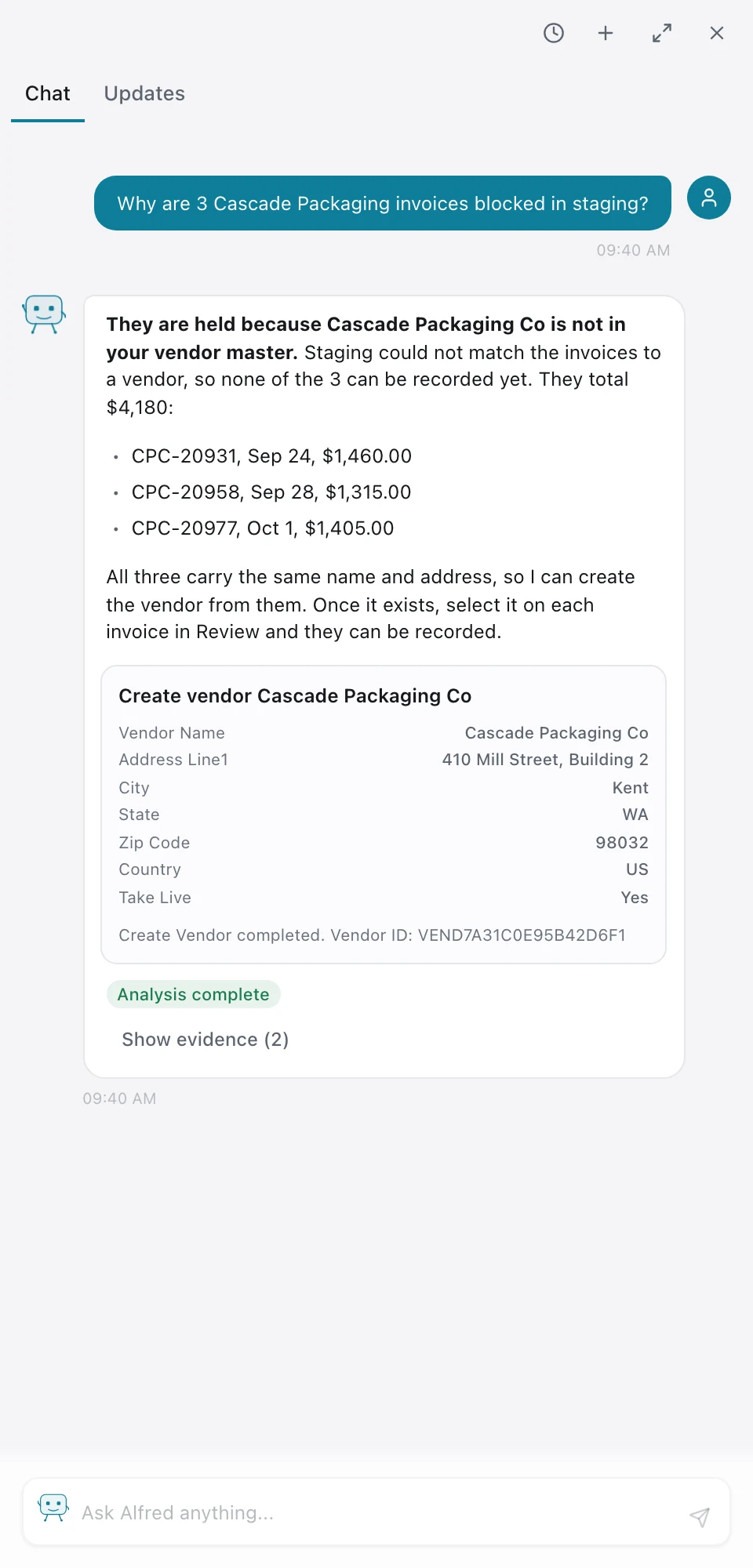
- Reading the 3 invoices from Cascade Packaging Co.
- Checking the vendor master: no match on name or tax ID.
Vendor not in master. 3 invoices waiting, $4,180. I can create the vendor from them.
Create vendor Cascade Packaging Co
- Cascade Packaging CoCreate3 invoices waitingName and address from the 3 invoicesAdd the vendor to the master
Confirmed.
Done. Cascade Packaging Co is in the vendor master. Select it on each of the 3 invoices in Review to record them.
The agents that do the routine work
Invoice AI
Reads each bill and proposes its purchase order.
Bootstrap Agent
Brings your chart, vendors and balances across.
Bank Recon Agent
Matches bank lines, and says when nothing matches.
Catalog Mapper
Finds each product under every channel's SKU.
Your numbers, in the AI app you already use.
FynOS connects to Claude over a read-only connection. Once you approve a company, Claude can run your saved reports, break a line down, compare periods, explain what changed, and trace a number to the record behind it. It reads the exceptions too, so it can find a payout that landed short and draft the claim for you to send. It cannot change anything in FynOS.
Read-only. Claude runs your reports, traces a number and drafts a claim.
What it can read
Saved reports and read-only records.
What it never sees
Individual pay records; payroll only as a total.
Consent per company
One company per approval, up to 30 days.
Revoke any time
Disconnect in FynOS and access stops at once.
What it can read
Saved reports and read-only records: orders, invoices, settlements, stock movements and journal entries.
What it never sees
Individual pay records. Payroll shows only as a report total.
Consent per company
You sign in with FynOS and pick one company. Each approval lasts up to 30 days.
Revoke any time
Disconnect in FynOS and access stops at once.
/fynos which payouts landed short last month?
One payout landed short. Amazon's Oct 2 payout of $86,300 reached Chase Operating and matches Amazon's statement, but 14 orders inside it were paid $2,140 less than they earned. Amazon paid each one for fewer units than it shipped.
Units shipped and not paid can be claimed back from Amazon. Want me to draft the claim?
/fynos yes, draft the claim for Amazon
Draft
Reimbursement request: 14 orders underpaid in settlement 25407719031
Hello Seller Support,
Our settlement for Sep 18 to Oct 1 (deposited Oct 2) paid 14 orders for fewer units than were shipped. Together they earned $3,023 and were paid $883, a shortfall of $2,140.
The attached file lists each order with the units shipped, the units paid and the amount owed. Please review and reimburse the difference.
amazon-short-pay-25407719031.csv · 14 rows
This is a draft for you to send from Seller Central. Nothing has been filed, and nothing in FynOS has changed.
/fynos show me our sales and costs by channel for last month
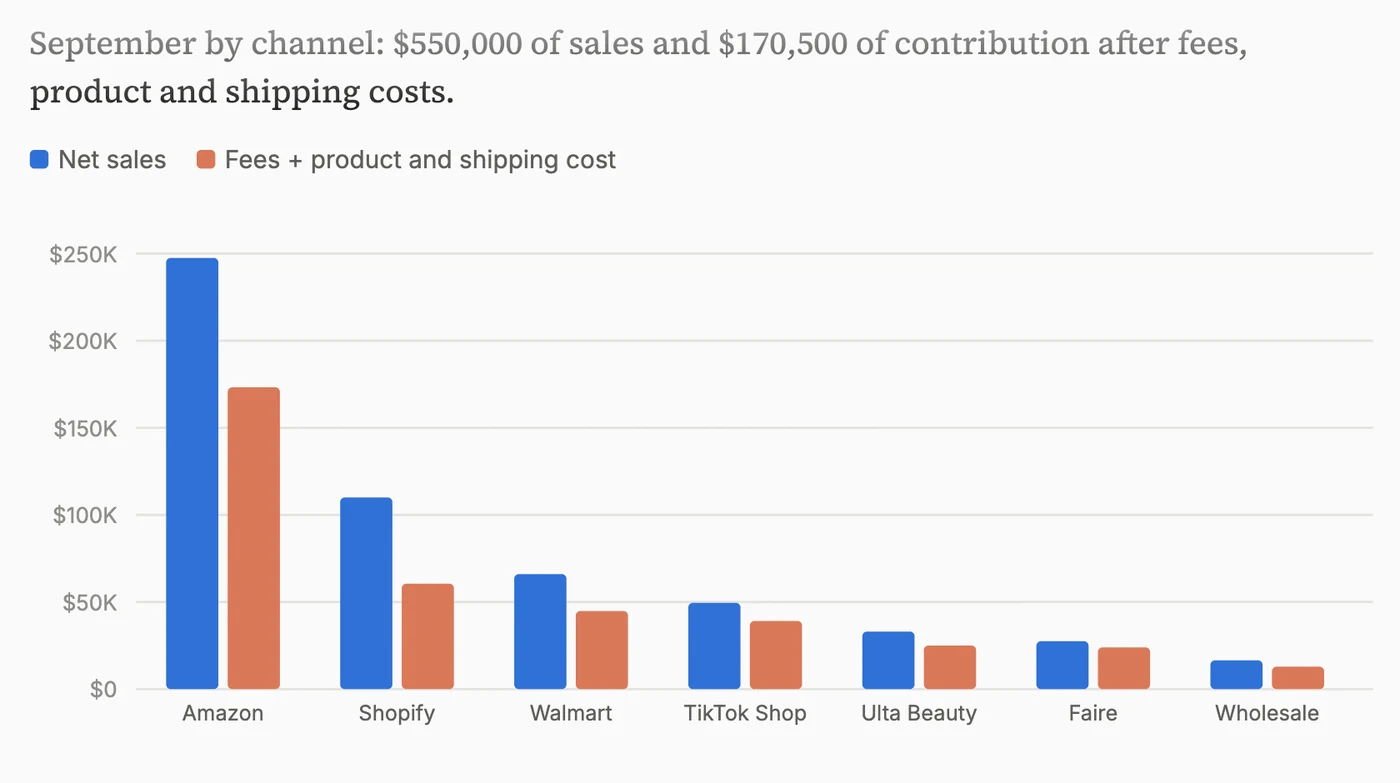
Contribution was $170,500 on $550,000 of sales. Shopify earns the most per dollar (45%); Amazon brings in the most ($74,250).
/fynos how does our cash look for Q4?
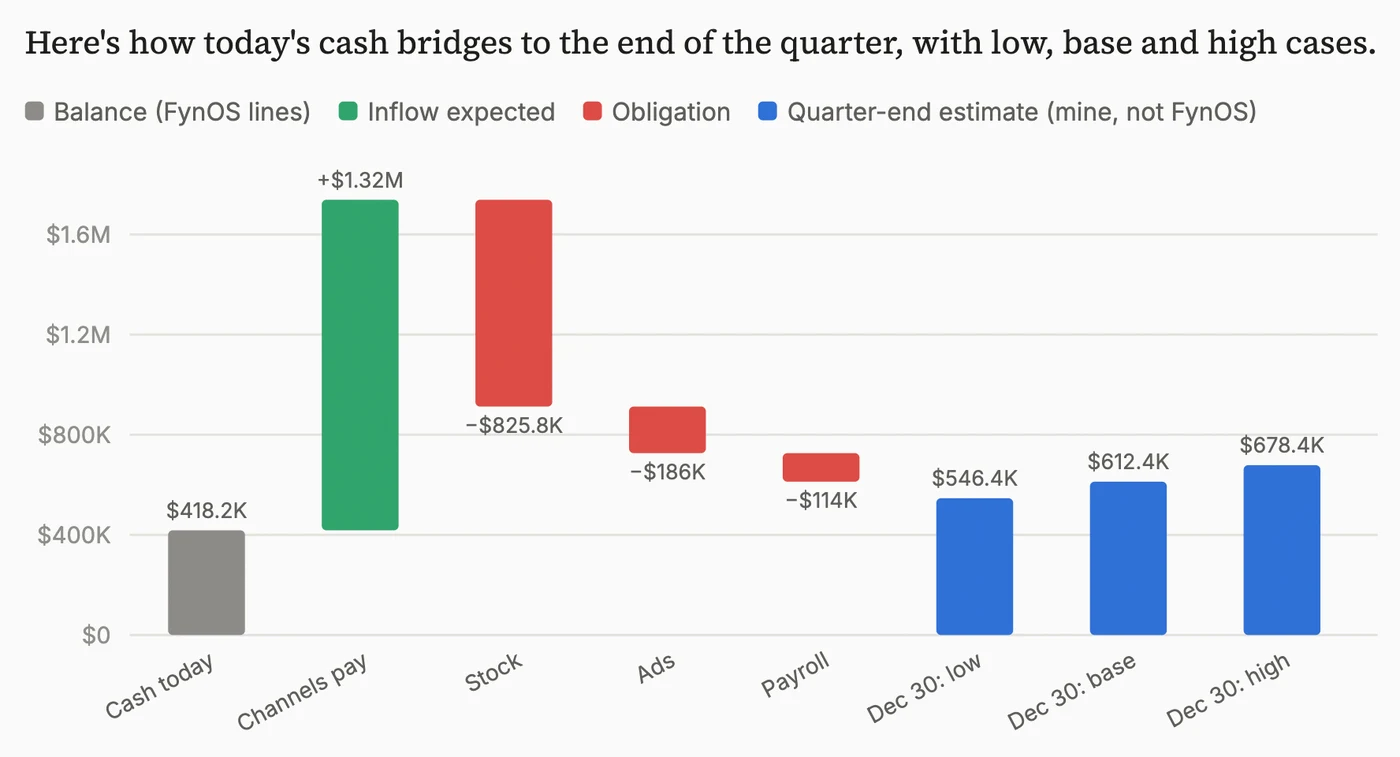
Short answer: Wrenfield ends the quarter near $612,400 in the base case, and the Oct 20 reorder of $50,400 fits in every case. The quarter-end figures are Claude's estimate from the reported lines.
/fynos show me our sales and costs by channel for last month
Contribution was $170,500 on $550,000 of sales. Shopify earns the most per dollar (45%); Amazon brings in the most ($74,250).
/fynos how does our cash look for Q4?
Short answer: Wrenfield ends the quarter near $612,400 in the base case, and the Oct 20 reorder of $50,400 fits in every case. The quarter-end figures are Claude's estimate from the reported lines.
Also in FynOS
Users and permissions
Roles per job, permissions module by module.
Segregation of duties
Whoever submits a bill cannot approve it.
Several companies
Hold a different role in each company of a group.
Migration
Chart, vendors and opening balances brought across.
Sales and vendor import
Historic orders and vendors brought in from files.
Revenue recognition
Recognized on the policy you set.
Marketplace sales tax
Collected by the marketplace, kept apart from yours.
Accounting software
Daily journal files for QuickBooks Online.
Credit and debit notes
Raised against the invoice or bill they adjust.
Exception queues
What did not tie waits with its reason.
Audit trail
Changes recorded with who made them and when.
Exports
Tables and reports to CSV, any time.
Book a working session on your own data.
Pick a date and time. 30 minutes.
Pick a date to see available times